
Pronto Team Communication
HitlabsCommunication
3.964.00 Reviews
- Version
- 7.0.7
- Installs
- 100.00K
- Age Rating
- Everyone
Screenshots

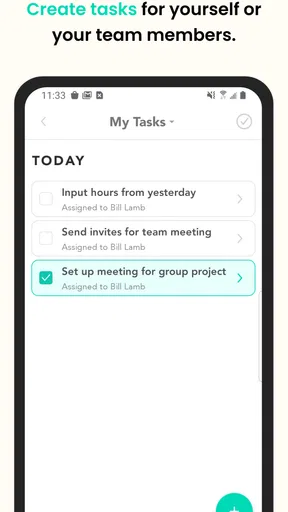
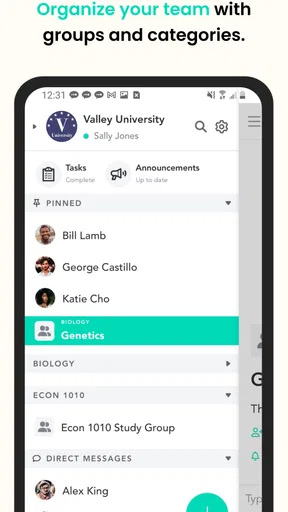
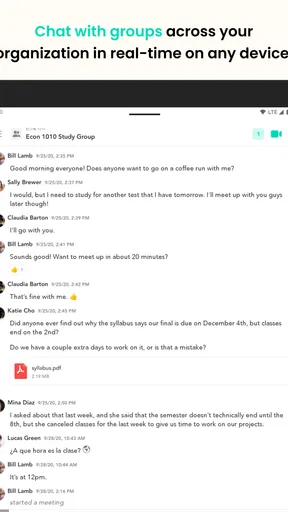
Our Review of Pronto Team Communication
 Analysis by Appyee
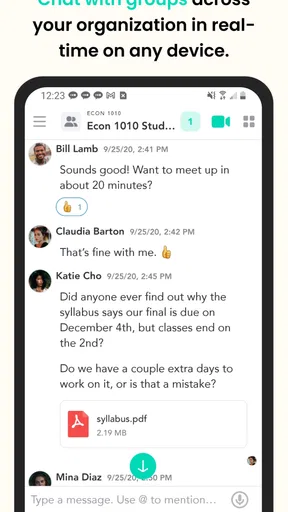
Pronto Team is a free communication app from Hitlabs built around group texting and video chat. I found its basic idea easy to understand: bring a small team or circle of friends into one shared space instead of splitting the conversation between ordinary text messages, separate video calls, and scattered updates. That makes it interesting for families, study groups, clubs, volunteer teams, and informal work projects where the conversation matters more than a large collection of business tools.
Its current store summary is “Group Text & Video Chat,” while the short description identifies it as Pronto Team. That distinction is useful because this is not trying to be a universal social network or a full office suite. I would approach it as a focused group communication tool. It is available at no charge, carries an Everyone age rating, and has reached over one hundred thousand installs. Those details suggest a product intended for broad, everyday use rather than a specialist audience.
After spending time with the app, my main impression is that its value depends on the size and habits of your group. If everyone wants one place for quick messages and occasional face-to-face conversation, the format feels practical. If you need advanced project management, deep file organization, formal workplace administration, or a huge public community, the usual alternatives will probably suit you better.
How Pronto Team feels in everyday use
I find Pronto Team easiest to judge by asking whether a shared group genuinely needs both written updates and video conversation. In this section, I’ll look at how that combination fits ordinary household routines, then consider the small agreements that help a shared space stay useful rather than becoming another source of missed messages.
A simple home for group conversations
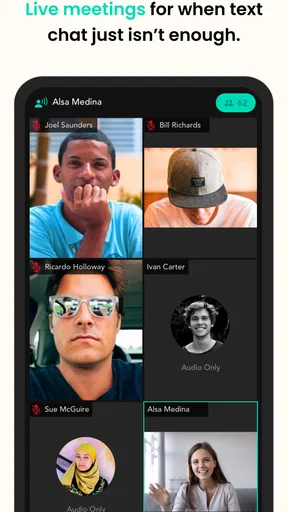
The strongest part of Pronto Team is the combination of text and video in the same communication flow. In many groups, a message thread starts with a simple question, grows into several replies, and eventually reaches the point where typing is slower than talking. Having group video chat as part of the same app makes that transition more natural than asking everyone to open another service.
A realistic example would be a family arranging a weekend gathering. One person can start with a written message about timing, others can respond when convenient, and the group can move to video when a decision needs a faster discussion. The benefit is not that every conversation needs video; it is that the group does not need to rebuild its membership and context when text is no longer enough.
I also see a useful role for small teams that do not need formal collaboration software. A community sports group could use the text side for schedule changes and the video side for a short planning conversation. A study group could keep questions in writing and use a call when a difficult topic needs explanation. In both cases, the app works best when the group already has a clear purpose and does not need a public discovery system.
Who will appreciate the focused approach
Pronto Team is most appealing to people who want less complexity. A parent coordinating several relatives, a tutor working with a small class, or a volunteer organizer may not want channels, dashboards, bots, task boards, and a long list of settings. A focused communication app can be easier to explain to people who are uncomfortable with crowded interfaces.
The Everyone rating also makes the app approachable for mixed-age groups, although I would still set sensible expectations with younger users and agree on appropriate group behavior. An age label does not replace the judgment of the person creating or managing a conversation.
On the other hand, I would hesitate to recommend it as the only communication system for a company that needs structured records, detailed permissions, searchable knowledge, or integrations with other work tools. Messaging and video are useful foundations, but they do not automatically provide the organization that a professional team may require.
What the current release tells me
The current version is 7.0.7, which shows that the app has moved well beyond its original release in July 2017. I would not read that version number as proof that every modern communication feature is present, but it does indicate continued product evolution rather than an untouched experiment. For an existing user, that matters: later releases can make the experience more dependable, adjust how familiar actions work, or refine the balance between messaging and calls.
My advice is to treat the current release as the version that deserves evaluation, not as a time capsule of the original app. People who tried an earlier build and disliked it may find the present experience more polished, while people who liked an older workflow should allow for small changes in navigation or behavior after updating.
The public store figures place the app at a 3.9 average from around two hundred ratings, with roughly sixty written reviews. I consider that a middle-ground signal: enough activity to show that real people use it, but not a reason to assume it will fit every group. The most useful question is whether its communication style matches your needs, not whether the score alone settles the decision.
How it compares with familiar alternatives
Compared with ordinary SMS or group texting, Pronto Team offers a more deliberate home for a shared conversation and adds group video to the same concept. That can reduce the awkward handoff between a message thread and a separate calling app. The trade-off is that every participant must be willing to use another app instead of relying on a communication method already built into the phone.
Compared with mainstream chat platforms, its appeal is narrower. Large messaging services often provide a wider mixture of media sharing, communities, reactions, desktop access, and social connections. Those ecosystems are convenient when your contacts already live there. Pronto Team makes more sense when you want a dedicated team-like space and do not need the surrounding social features.
Compared with workplace platforms, it appears easier to approach but less suitable for formal operations. Tools designed for companies usually separate topics into channels, connect conversations to files or tasks, and give administrators more control. Pronto Team is better viewed as a lightweight communication room than as a replacement for a complete digital workplace.
Compared with a standalone video meeting app, its advantage is continuity. You can begin with text rather than scheduling a formal meeting every time. The limitation is that people who only need occasional calls may find a dedicated video service more familiar, especially if their group already has an established meeting routine.
Small habits that make the app more useful
One practical habit is to decide what belongs in writing before starting a video conversation. Put the key question, time, or decision in the group text first. That gives people who cannot join the call a chance to understand the issue and leaves a clearer reference afterward. It also prevents a short call from becoming the only place where an important detail exists.
A second useful approach is to keep one group focused on one purpose. Combining family plans, work requests, and casual conversation in the same space can make any communication app tiring. Pronto Team’s simplicity works better when the group has a clear identity. A separate conversation for a project or event makes it easier to recognize which messages need action.
For video, I would avoid assuming that everyone is ready to talk the moment a call begins. A quick written note can help people prepare, find a quieter location, or decide whether video is really necessary. This is a small workflow change, but it makes the text-and-video combination feel intentional instead of disruptive.
I would also use the app as a supplement rather than an automatic replacement during a trial period. Keep your existing method available while the group learns the new routine. The real test is not whether one person likes the interface; it is whether the least enthusiastic participant can join, understand the conversation, and return later without feeling lost.
Where the experience still has limits
The biggest potential friction is adoption. A communication app only works when the whole group agrees to meet there. If half the participants remain on another messenger, the supposed convenience quickly disappears. This is especially important for family groups and informal communities, where nobody may have responsibility for onboarding everyone else.
There is also a difference between having video chat and having a complete meeting environment. People who expect advanced presentation controls, formal scheduling, detailed moderation, extensive collaboration tools, or a robust archive should compare Pronto Team carefully with dedicated services before moving an important group. The app’s focused identity is a strength for simple conversations, but it can become a limitation as coordination becomes more demanding.
Another consideration is the risk of conversation overload. Combining text and video can encourage groups to use the same space for every kind of update. Without a shared etiquette, members may receive too many interruptions or miss the messages that matter. I would establish basic rules early: when to write, when to call, and where to repeat decisions for people who were unavailable.
I would skip Pronto Team if my priority were a broad public network, a deep archive of work documents, or a formal organization with strict administrative requirements. I would also skip it if my contacts already use another platform consistently and see no reason to change. In those situations, the network effect of the existing alternative is more valuable than the app’s focused design.
What existing users should consider after updating
Users who have been with the app since its earlier years should pay attention to how their familiar routines fit the current version. Moving from the original 2017 release to version 7.0.7 represents a substantial product lifespan, so it is reasonable to expect that the interface and interaction details may not feel exactly as they once did. Before relying on it for an important event, I would open the current build, check the group flow, and make sure everyone knows how to reach the video conversation.
That check is particularly worthwhile for groups that meet infrequently. A family may remember the general idea of the app but forget the practical steps by the time the next call is needed. A short test message and a brief trial call can reveal confusion early, without turning the real event into technical support.
New users should make the same test with a small group rather than inviting everyone immediately. Start with the people who will use the app most often, agree on the purpose of the conversation, and see whether text is enough for normal updates. If the group naturally turns to video when needed, the app is probably filling a genuine gap. If everyone keeps switching back to another messenger, that is useful information too.
What I would watch going forward
For future development, I would watch how Hitlabs continues to balance simplicity with the expectations created by modern communication apps. The product does not need to copy every feature from larger platforms, but it does need to keep the central path from group text to video clear and dependable. Improvements that reduce confusion without adding clutter would be especially valuable for the audience this app appears to target.
I would also watch the experience for established groups after updates. A communication tool earns trust through consistency: people should be able to return to a familiar conversation and understand what changed. At the same time, updates should keep the app comfortable for new users who are joining a group for the first time.
My final view is positive but specific. Pronto Team is worth trying when you need a lightweight shared space for group messages and video conversations, especially if your group values a calmer alternative to a sprawling social platform. Its free access lowers the barrier to testing it, and the long development history gives it more substance than a brand-new experiment. Still, I would not present it as a universal replacement for texting, established chat networks, or full workplace software.
The best reason to choose Pronto Team is the smooth idea of keeping a group’s written conversation and face-to-face discussion together. If that matches the way your family, club, class, or small team communicates, it can be a sensible addition to your phone. If your needs center on advanced organization, large communities, or strict administration, a more specialized alternative will likely serve you better.
For me, the app succeeds when it stays in that middle ground: more purposeful than a casual text thread, but less demanding than a corporate collaboration suite. That is a clear role, and the current release makes it reasonable to give that role a practical trial with the people who would actually use it.
Verdict
Strengths of Pronto Team Communication
- Fast team messaging for urgent updates and coordination.
- Keeps conversations organized by teams, topics, or projects.
- Useful for sharing announcements with a large workforce.
- Supports quick communication without relying on email threads.
- Helps distributed teams stay connected during daily operations.
Limitations of Pronto Team Communication
- May feel unnecessary for very small teams with simple communication needs.
- Frequent alerts can become distracting without careful notification settings.
- Requires consistent team adoption to keep information in one place.
- Older messages may be difficult to find in busy conversations.
- Some features may depend on the organization’s subscription or setup.
Similar Picks in This Category
View All
Google Messages
Google LLC4.6

Gmail
Google LLC4.1

Google Meet
Google LLC4.4

Google Chrome
Google LLC4.1

WhatsApp Messenger
WhatsApp LLC4.6

Carrier Services
Google LLC4.2
Frequently Asked Questions
What is Pronto Team Communication used for?
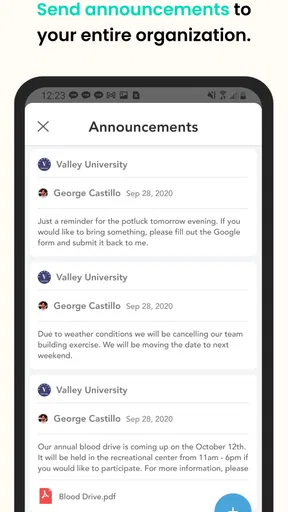
Pronto Team Communication is a workplace messaging and collaboration app designed to help teams communicate in real time. It can be used for direct messages, group conversations, file and image sharing, announcements, and operational updates. It is particularly useful for businesses with deskless, remote, field, or distributed employees who need a central place for fast team communication.
Is Pronto Team Communication suitable for businesses of all sizes?
The app can support different types of organizations, but its usefulness depends on how the company configures teams, channels, permissions, and communication policies. Smaller groups may use it for simple messaging, while larger companies can organize conversations by department, location, project, or shift. Before downloading, confirm that your organization already has a Pronto account or invitation.
Can I use Pronto Team Communication on both Android and iPhone?
Pronto Team Communication is intended for mobile workplace communication and may be available for Android and iOS devices, depending on the current distribution in your region. Users should download it from the official Google Play Store or Apple App Store and check the listed operating-system requirements. Some features may also depend on your company’s account, subscription, or administrator settings.
Does Pronto Team Communication require an account or company invitation?
Yes, workplace communication platforms such as Pronto generally require users to sign in through an organization-managed account, invitation, or approved workspace. Installing the app alone may not provide access to conversations or company information. If you cannot log in, ask your administrator or manager to verify your email address, phone number, invitation status, and organization settings.
What privacy and notification considerations should I know before using it?
Because Pronto is designed for workplace communication, messages and shared content may be managed according to your employer’s policies, retention rules, and administrator permissions. Review the privacy information before using the service for sensitive material. You should also check notification settings, since frequent alerts can affect battery life and personal time; the app usually allows notifications to be adjusted by conversation or account.
